
Some webmasters and small business owners use WordPress as CMS. They may not need any sort of RSS feed. This is also good for security and private space blogs. You can easily disable all RSS feed by editing functions.php file. This file used to change the default behaviors of WordPress. It goes in your Theme’s folder. A Child Theme can have its own functions.php.
The functions file behaves like a WordPress Plugin, adding features and functionality to a WordPress site. You can use it to call functions, both PHP and built-in WordPress, and to define your own functions. You can produce the same results by adding code to a WordPress Plugin or through the WordPress Theme functions file.
How do I edit functions.php?
Click on Appearance > Themes > Theme Editor > Locate and edit your functions.php. Beware: if you do not edit file properly the results can be unexpected — even site-disabling. Make a backup of your exisiting file using ftp / sftp.
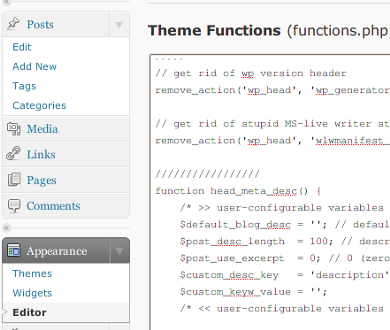
Make sure you add the following code between <?php ?> tags.
/**
 * Disable Our Feed Urls
 */
function disable_our_feeds() {
	wp_die( __('<strong>Error:</strong> No RSS Feed Available, Please visit our <a href="'. get_bloginfo('url') .'">homepage</a>.') );
}

add_action('do_feed', 'disable_our_feeds', 1);
add_action('do_feed_rdf', 'disable_our_feeds', 1);
add_action('do_feed_rss', 'disable_our_feeds', 1);
add_action('do_feed_rss2', 'disable_our_feeds', 1);
add_action('do_feed_atom', 'disable_our_feeds', 1);
Save and close the file.

Great!! It worked! :D
no more RSS feed :D
Thanks a lot! This worked great.
It works !! Thanks a ton !
For novices like me the complete code with php tags is :
this is nice but the rss icon in the url (firefox) is still there. Why ?
Manu’s issue is the same as mine….the RSS icon needs to go away somehow also….any suggestions?
in your header.php remove meta tags related to rss feed and the icon will be removed….
Unfortunately /feed/rss will still work, so this is no solution.
Try this:
create a directory called “feed” in your wordpress root and upload a blank index page (e.g. index.html or index.php etc.). RSS links from WP will display a wonderful white page instead of rss file.
great tip! YAY! thanks!
Instead of the wp_die, I use wp_redirect(get_option(‘siteurl’)); which just sends them back to the homepage. I also disable rss from the head by removing it from the template altogether. Combined these remove the icon and the actual feed url from working at all.
Thanks for a neat, clean solution!
Any idea how this can be used to OVERWRITE the template being used e.g. for RSS2? I don’t want to change the core files, but it seems like there is no other way…
I agree, this is a wast of time: it does not work!!!!
Many Thanks, because SPAM robots were posting SPAM using my RSS FEEDS !
We find another way:
insert into .htaccess before wordpress rewrite rule
2 line:
RewriteRule feed – [G,L]
ErrorDocument 410 /410.html
and adding in root dirrectory (where wp-config.php) file 410.html with your content.
Thats all. Fully working mechanism.
Warning – Working only with pretty permalink!!!
HELP!! I embedded this code and now i only get a bunch of errors and cannot get back to my edit page on wordpress???
Ugh! I tried this and all it did was add a bunch of jibberish text at the top of my page where the normal WordPress header goes and it didn’t remove the RSS feed logo, which is all I wanted to do because I don’t need that. Admittedly, I’m a graphic designer, not a programmer. I can always have my web guy edit it because he has admin access …but it’d be easier if I just knew how it worked :) Thanks!
Tnx dude, this worked perfect.
You have to put the code before the function get_feed from the top. Save the file like that and add it back on your server. You can add what message you want to show like a “error” ! :)
Thanks for the information. Problem solved.
HELP!!
I edited this code and I can’t even access my wp-admin now…..? Where do I go from now?
Just one question:
Even if you’re a webmaster of a small site or use wordpress as a CMS. Why the h* would you want to disable your rss-feed? It allows easily staying in touch with your site/news. If you want your readers to go to your page, use excerpts (the more-tag).
Also, most of the proposed workarounds are probably lost after an upgrade. And you really do need wordpress-updates eg. because of security issues.
Better use a plugin which handles this: https://wordpress.org/extend/plugins/search.php?q=disable+rss+feed&sort=
Still, I see no reasonable reason to do so.
Worked for me, thanks!
/** * Disable Our Feed Urls */ function disable_our_feeds() { wp_redirect(get_option(‘siteurl’)); } add_action('do_feed', 'disable_our_feeds', 1); add_action('do_feed_rdf', 'disable_our_feeds', 1); add_action('do_feed_rss', 'disable_our_feeds', 1); add_action('do_feed_rss2', 'disable_our_feeds', 1); add_action('do_feed_atom', 'disable_our_feeds', 1);When I do this my blog disappears! Very strange.
“/feed/rss will still work”
That is NOT true, if you do it good, none of your feeds will work!
So yes the script works
Hello, first of all thanks for the solution, it worked great for me!
To those who didn’t manage to use the procedure (WordPress got messed up with code after modifying functions.php), make sure you put the code into tags, else it won’t be recognized as php code, therefore shown on screen as text. It also happened to me firstly :-)